
 All vikis
 007 First Light
 Aion 2
 Ananta
 ARC Raiders
 ArcheAge Chronicles
 Call of Duty: Modern Warfare 4
 ChatGPT
 Chrono Odyssey
 Civilization 3
 Civilization 4
 Claude
 Crimson Desert
 Deadlock
 Diablo 4
 Diablo 5
 Enshrouded
 Fable
 Final Fantasy Resonance
 Football Manager 27
 Forza Horizon 6
 God of War
 Grand Theft Auto 6
 Heroes of Might and Magic 3
Microsoft 365 Copilot
Microsoft 365 Copilot is Microsoft's AI for work inside Word, Excel, PowerPoint, Outlook and Teams, grounded in your company's email, files and meetings; it costs $30 a user a month billed yearly for enterprises and $21 for small businesses (discounted to $18 through Dec 31, 2026), while Copilot Chat comes free with Microsoft 365 work accounts, as of Nov 6, 2026.
Microsoft 365 Copilot is the paid add-on that puts Microsoft's AI to work across Word, Excel, PowerPoint, Outlook, Teams and OneNote, answering from your organization's emails, files, meetings and chats as well as the web. As of Nov 6, 2026 it costs $30 a user a month billed yearly, or $31.50 paid monthly on a yearly commitment, for enterprises; small businesses with up to 300 users buy Microsoft 365 Copilot Business at $21 a user a month billed yearly, discounted to $18 for the first year on offers between Jul 1 and Dec 31, 2026. Without the add-on, work accounts still get Copilot Chat, a web-grounded AI chat, at no extra cost. Microsoft now calls the product Microsoft Copilot in many places: its Learn docs say the Microsoft 365 Copilot app is now called Microsoft Copilot, at copilot.cloud.microsoft.
It is the pick for companies that already run on Microsoft 365, because it works inside the apps and respects existing file permissions. Its newer agent features, Cowork, Code and Autopilot, are billed by usage on top of the license, which makes costs harder to predict. Companies on Google Workspace get similar help from Gemini in Gmail and Docs; for a single assistant across apps, ChatGPT Business or Claude Team also connect to Microsoft 365. Individuals with Microsoft 365 Personal, Family or Premium use the consumer Microsoft Copilot instead.
Quick facts
| Get it | copilot.cloud.microsoft, the Microsoft Copilot app, Word, Excel, PowerPoint, Outlook, Teams, OneNote |
| Maker | Microsoft |
| Price | Enterprise $30 a user a month yearly; Business $21, $18 on offer; usage billing for Cowork, Code and Autopilot (as of Nov 6, 2026) |
| Free part | Copilot Chat with eligible Microsoft 365 work and school licenses |
| Included in | Microsoft 365 E7, Business Premium with Copilot ($32), Business Standard with Copilot ($23.50) |
| Models | Auto routing between OpenAI's and Anthropic's models, among others (Microsoft) |
| Built-in agents | Researcher and Analyst |
| Best for | Organizations on Microsoft 365 |
| Open weights | No |
Plans and prices
| Plan | Price | What you get |
|---|---|---|
| Copilot Chat | Included with eligible Microsoft 365 licenses | Chat grounded in the web; work files only when you upload or open them; pay-as-you-go agents |
| Microsoft 365 Copilot (enterprise add-on) | $30 a user a month yearly, $31.50 monthly | Copilot in the apps with priority access, chat grounded in work data, Copilot Search across 100 or more connectors, Notebooks, agents, Copilot Analytics |
| Microsoft 365 Copilot Business (add-on, up to 300 users) | $21 a user a month yearly, $18 on offer | The same Copilot capabilities, licensed for small businesses |
| Microsoft 365 Business Standard with Copilot | $23.50 a user a month yearly | The apps, business email and Teams, with Copilot built in |
| Microsoft 365 Business Premium with Copilot | $32 a user a month yearly | Adds advanced security and data protection |
| Microsoft 365 E7 | Through Microsoft sales | E5 plus Copilot, the Microsoft Entra Suite and Agent 365 (Microsoft Learn) |
Prices from Microsoft's enterprise and business pages, read Nov 6, 2026. All need an annual commitment and a qualifying Microsoft 365 plan. Some features, including Cowork and Code, are billed by usage in Copilot Credits on top (Microsoft Learn). Users without the add-on still get standard (not priority) access to some Copilot features in Word, Excel, PowerPoint and OneNote.
Features
Copilot in the apps. In Word it drafts, rewrites and summarizes; in Excel it analyzes data and builds formulas and charts; in PowerPoint it creates and reformats decks; in Outlook it drafts mail and summarizes threads; in Teams it summarizes and transcribes meetings and lists action items (Microsoft Learn).
Work grounding. With the license, answers draw automatically on Microsoft Graph and Work IQ, Microsoft's layer over your emails, files, meetings and colleagues, and only show what each person already has permission to see. Admins can switch Work IQ off.
Researcher and Analyst. Two ready-made agents included with the license, for multi-step research reports and for data analysis (Microsoft). In a Feb 2026 tutorial, Lisa Crosbie said the two shared a cap of 25 uses per user a month at the time of recording.
Cowork, Code and Autopilot. Announced on Sep 25, 2026: Cowork carries out a delegated task end to end, Code builds small apps from plain language (in Microsoft's Frontier preview), and Autopilot, formerly called Scout, is an always-on agent in the cloud. All three are billed by usage.
Model choice. A model picker offers Auto, Quick response and Think deeper. Claude models from Anthropic are available in licensed experiences, though not to every user by default, and Microsoft said on Nov 5, 2026 it is bringing them inside the EU Data Boundary.
Agents and Copilot Studio. Organizations add Microsoft-built agents or build their own in Copilot Studio; Microsoft launched role versions for legal (Oct 23, 2026) and finance (Oct 29, 2026).
Privacy and data
Signed in with a work (Entra ID) account, prompts and responses are covered by Microsoft's Enterprise Data Protection, the same contractual terms as Exchange mail and SharePoint files, and EU traffic stays inside the EU Data Boundary. Microsoft's consumer Copilot FAQ says Entra ID users are excluded from model training. See AI Privacy Compared.
Microsoft 365 Copilot vs the alternatives
Gemini in Google Workspace is the equivalent for Gmail, Docs and Sheets; Google AI Pro brings it to personal accounts for $19.99 a month.
ChatGPT Business and Claude Team are general assistants that also connect to Microsoft 365; Claude Team starts at $25 a seat monthly or $20 yearly. Pick them when people want one assistant for coding, writing and research beyond Office.
Notion AI fits teams that keep their docs and projects in Notion.
Microsoft Copilot is the consumer version that comes with Microsoft 365 Personal, Family and Premium.
Frequently asked questions
How much does Microsoft 365 Copilot cost? Microsoft 365 Copilot costs $30 a user a month billed yearly ($31.50 paid monthly) for enterprises, and Microsoft 365 Copilot Business costs $21 a user a month yearly, discounted to $18 through Dec 31, 2026, as of Nov 6, 2026.
Is Microsoft 365 Copilot Chat free? Yes. Microsoft 365 Copilot Chat is included with eligible Microsoft 365 work and school licenses; it answers from the web and from files you upload, while the paid Microsoft 365 Copilot add-on grounds answers in all your work data.
What is the difference between Copilot Chat and Microsoft 365 Copilot? Copilot Chat is the free chat for work accounts, grounded in the web; Microsoft 365 Copilot, the paid add-on, adds priority access in Word, Excel and PowerPoint, automatic grounding in your emails, files and meetings, and the Researcher and Analyst agents.
Is Microsoft 365 Copilot renamed Microsoft Copilot? Partly. Microsoft's documentation says the Microsoft 365 Copilot app is now called Microsoft Copilot, while the license is still sold as Microsoft 365 Copilot, as of Nov 6, 2026.
Does Microsoft 365 Copilot use Claude? Yes. Microsoft 365 Copilot can use Anthropic's Claude models alongside OpenAI's in licensed experiences, chosen by Auto or a model picker, though admins control availability.
Sources
- Microsoft Copilot for enterprise, Microsoft, read Nov 6, 2026
- Microsoft Copilot for small business, Microsoft, read Nov 6, 2026
- What is Microsoft Copilot?, Microsoft Learn, Nov 5, 2026
- License options for Microsoft Copilot, Microsoft Learn, Oct 19, 2026
- Compare Copilot in E3, E5, and E7, Microsoft Learn, Oct 28, 2026
- Introducing the new Copilot with Home, Code and Autopilot, Microsoft, Sep 25, 2026
- Building the system for AI at work, Microsoft, Sep 23, 2026
- Bringing Claude models in Microsoft Copilot into the EU Data Boundary, Microsoft, Nov 5, 2026
- Introducing Microsoft Copilot for legal, Microsoft, Oct 23, 2026
- Microsoft Copilot for finance, Microsoft, Oct 29, 2026
- Privacy FAQ for Microsoft Copilot, Microsoft Support, read Nov 6, 2026
- Microsoft 365 Copilot: Built for Work, Microsoft Copilot, Jun 23, 2026 (video)
- Microsoft 365 Copilot: Complete Tutorial for Beginners (2026), Lisa Crosbie, Feb 23, 2026 (video)
- Plans and pricing, Claude, read Nov 6, 2026
- Google AI plans, Google, read Nov 6, 2026
Moments
Microsoft 365 Copilot: Built for Work
Microsoft Copilot
- Microsoft 365 Copilot is the paid add-on that puts Microsoft's AI to work across Word, Excel, PowerPoint, Outlook…
- Cowork, Code and Autopilot. Announced on Sep 25, 2026: Cowork carries out a delegated task end to end, Code builds…
- Model choice. A model picker offers Auto, Quick response and Think deeper. Claude models from Anthropic are available…
- Agents and Copilot Studio. Organizations add Microsoft-built agents or build their own in Copilot Studio; Microsoft…
Microsoft 365 Copilot: Complete Tutorial for Beginners (2026)
Lisa Crosbie
- Copilot in the apps. In Word it drafts, rewrites and summarizes; in Excel it analyzes data and builds formulas and…
- Work grounding. With the license, answers draw automatically on Microsoft Graph and Work IQ, Microsoft's layer over…
- Researcher and Analyst. Two ready-made agents included with the license, for multi-step research reports and for data…
- Signed in with a work (Entra ID) account, prompts and responses are covered by Microsoft's Enterprise Data Protection…
Related
-
-
-
-
-
-
 CometComet is Perplexity's AI web browser, free for everyone since Oct 2, 2025 and available on Mac, Windows, iOS and Android. Its built-in Comet Assistant can read pages and carry out tasks for you; the agent needs a paid Perplexity plan.
-
 Gemini in ChromeGemini in Chrome is Google's Gemini assistant built into the Chrome browser on Windows, Mac, Chromebook Plus and Android. It reads your open tabs and connects to Google apps; its agent, auto browse, is rolling out to Google AI Pro and Ultra subscribers, first in the US.
-
See also
-
-
-
-
 Microsoft CopilotMicrosoft Copilot is Microsoft's AI assistant app for Windows, the web and phones. It is free with lower limits, and higher use comes with Microsoft 365 Personal ($9.99 a month), Family ($12.99) or Premium ($19.99), as of Nov 6, 2026.
-
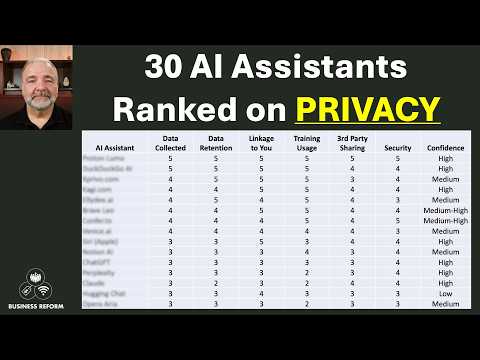 AI Privacy ComparedAs of Nov 6, 2026, ChatGPT, Microsoft Copilot, Mistral's Vibe, Perplexity, Grok and DeepSeek can train on consumer chats unless you opt out, Gemini trains only while Keep Activity is on, and Claude trains only if you allow it; business plans from OpenAI, Anthropic, Microsoft and Perplexity do not train on your data.
-