
 All vikis
 007 First Light
 Aion 2
 Ananta
 ARC Raiders
 ArcheAge Chronicles
 Call of Duty: Modern Warfare 4
 ChatGPT
 Chrono Odyssey
 Civilization 3
 Civilization 4
 Claude
 Crimson Desert
 Deadlock
 Diablo 4
 Diablo 5
 Enshrouded
 Fable
 Final Fantasy Resonance
 Football Manager 27
 Forza Horizon 6
 God of War
 Grand Theft Auto 6
 Heroes of Might and Magic 3
Granola
Granola is an AI notepad for meetings that transcribes from your own computer's audio, so no bot joins the call, and turns your rough notes into full ones. It is free with 30 days of history, and Business costs $14 a user a month as of Nov 6, 2026, on Mac, Windows, iPhone and Android.
Granola is an AI notepad for meetings: you jot rough notes while it transcribes the call in the background from your computer's audio, and afterward it merges your notes and the transcript into clean meeting notes you can chat with. It does not join the meeting as a bot and does not store the audio, only the transcript and notes. As of Nov 6, 2026 it is free with 30 days of meeting history; Business costs $14 a user a month and Enterprise $35. It runs on macOS, Windows, iOS and Android, and works with Zoom, Google Meet, Teams and any other meeting app.
Granola is the pick for people who take part in meetings and want notes without a visible recorder in the room. Two cautions: everyone in the call should still be told they are being transcribed, and Granola trains on anonymized data by default on Basic and Business (you can opt out; Enterprise is off by default). For a recorder that joins every call and builds a shared team archive, Otter.ai fits better; inside Notion, Notion AI has its own bot-free meeting notes.
Quick facts
| Get it | granola.ai for macOS, Windows, iOS, Android and Apple Watch |
| Maker | Granola |
| Price | Free; Business $14, Enterprise $35 a user a month (as of Nov 6, 2026) |
| How it listens | Your computer's audio; no bot joins (Granola) |
| Audio kept | No; transcript and notes only |
| Free limits | 30 days of meeting history, automatic model choice |
| Funding | $125 million Series C at a $1.5 billion valuation, Mar 25, 2026 |
| Best for | Personal meeting notes without a bot |
| Open weights | No |
Plans and prices
| Plan | Price | What you get |
|---|---|---|
| Basic | $0 | AI meeting notes, AI chat within and across meetings (automatic model), 30 days of history |
| Business | $14 a user a month | Unlimited history, advanced thinking models and model choice, integrations (Attio, Notion, HubSpot, Affinity, Zapier), API, MCP, central billing |
| Enterprise | $35 a user a month | SSO, SCIM, org-wide auto-deletion, admin controls, HIPAA-compliant workspaces, training off by default, priority support |
Source: Granola pricing, read Nov 6, 2026; the page lists monthly prices only.
Features
Notes without a bot. Granola transcribes in real time on Mac and Windows from your computer's audio, so nothing new appears in the participant list; on phones it uses temporarily cached audio for in-person meetings (Granola).
Your notes, enhanced. Whatever you type during the call steers the final notes, which Granola fills out from the transcript.
Granola Chat and Spaces. Ask questions across all your meetings; Spaces, added with the Series C in Mar 2026, keep a Team Space and private My Notes, with folders and team chat.
Briefs and MCP. Briefs, launched May 20, 2026, prepare you for a meeting as you join, on Mac and Windows; Granola MCP (Feb 4, 2026) lets other AI tools read your meeting notes.
Mobile. The Android app arrived Jul 1, 2026 and an Apple Watch app on Jul 28, 2026.
Privacy and data
Granola says it does not store meeting audio, trains on anonymized data unless you opt out in Settings (off by default on Enterprise), and does not allow third parties such as OpenAI or Anthropic to train on your data. It uses providers such as Deepgram and AssemblyAI for transcription and OpenAI and Anthropic for summaries, and reached SOC 2 Type 2 compliance in Jul 2025. See AI Privacy Compared.
Granola vs the alternatives
Otter.ai sends a bot that records and transcribes each call, keeps a searchable team archive, and gives 300 free minutes a month; pick it when a full record matters more than discretion.
Notion AI includes bot-free meeting notes with Notion's $20 Business plan and can trigger Custom Agents from them.
Microsoft 365 Copilot recaps Teams meetings for organizations on Microsoft 365.
Frequently asked questions
Is Granola free? Yes. Granola's Basic plan is free, with AI meeting notes and chat and 30 days of meeting history, as of Nov 6, 2026.
How much does Granola cost? Granola Business costs $14 a user a month and Enterprise $35 a user a month, as of Nov 6, 2026.
Does Granola join the meeting? No. Granola transcribes from your computer's audio, so no bot joins the call; it works with Zoom, Google Meet, Teams and other meeting apps.
Does Granola record audio? Granola transcribes in real time and says it does not store meeting audio; it keeps the transcript and your notes.
Does Granola work on Windows and Android? Yes. Granola runs on macOS, Windows, iOS and Android, as of Nov 6, 2026.
Sources
- Granola, Granola, read Nov 6, 2026
- Pricing, Granola, read Nov 6, 2026
- Security, Granola, read Nov 6, 2026
- Granola raises $125M to put your company's context to work, Granola, Mar 25, 2026
- Introducing Granola MCP, Granola, Feb 4, 2026
- Granola for Android is here, Granola, Jul 1, 2026
- Blog, Granola, read Nov 6, 2026
- Granola AI Tutorial for Beginners, Kevin Stratvert, Aug 6, 2026 (video)
- Pricing, Otter.ai, read Nov 6, 2026
- Pricing, Notion, read Nov 6, 2026
Moments
Granola AI Tutorial for Beginners
Kevin Stratvert
- Granola is an AI notepad for meetings: you jot rough notes while it transcribes the call in the background from your…
- Your notes, enhanced. Whatever you type during the call steers the final notes, which Granola fills out from the…
- Granola Chat and Spaces. Ask questions across all your meetings; Spaces, added with the Series C in Mar 2026, keep a…
- Mobile. The Android app arrived Jul 1, 2026 and an Apple Watch app on Jul 28, 2026.
Photos
Related
-
-
 CometComet is Perplexity's AI web browser, free for everyone since Oct 2, 2025 and available on Mac, Windows, iOS and Android. Its built-in Comet Assistant can read pages and carry out tasks for you; the agent needs a paid Perplexity plan.
-
 Gemini in ChromeGemini in Chrome is Google's Gemini assistant built into the Chrome browser on Windows, Mac, Chromebook Plus and Android. It reads your open tabs and connects to Google apps; its agent, auto browse, is rolling out to Google AI Pro and Ultra subscribers, first in the US.
-
-
 Character.AICharacter.AI is a platform for chatting and role-playing with AI characters, free with ads and optional plans ((c.ai) lite from $4.99 a month, or c.ai+). It filed for Chapter 11 on Oct 12, 2026 to sell itself, with Disney as the lead bidder; the app still runs, and users under 18 cannot use open-ended chat.
-
-
-
See also
-
-
-
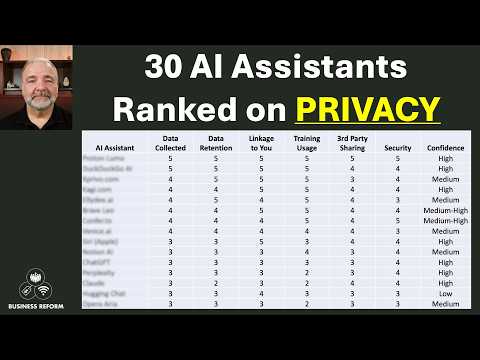 AI Privacy ComparedAs of Nov 6, 2026, ChatGPT, Microsoft Copilot, Mistral's Vibe, Perplexity, Grok and DeepSeek can train on consumer chats unless you opt out, Gemini trains only while Keep Activity is on, and Claude trains only if you allow it; business plans from OpenAI, Anthropic, Microsoft and Perplexity do not train on your data.
-
 Microsoft 365 CopilotMicrosoft 365 Copilot is Microsoft's AI for work inside Word, Excel, PowerPoint, Outlook and Teams, grounded in your company's email, files and meetings; it costs $30 a user a month billed yearly for enterprises and $21 for small businesses (discounted to $18 through Dec 31, 2026), while Copilot Chat comes free with Microsoft 365 work accounts, as of Nov 6, 2026.
-
-