
 All vikis
 007 First Light
 Aion 2
 Ananta
 ARC Raiders
 ArcheAge Chronicles
 Call of Duty: Modern Warfare 4
 ChatGPT
 Chrono Odyssey
 Civilization 3
 Civilization 4
 Claude
 Crimson Desert
 Deadlock
 Diablo 4
 Diablo 5
 Enshrouded
 Fable
 Final Fantasy Resonance
 Football Manager 27
 Forza Horizon 6
 God of War
 Grand Theft Auto 6
 Heroes of Might and Magic 3
Gemini in Chrome
Gemini in Chrome is Google's Gemini assistant built into the Chrome browser on Windows, Mac, Chromebook Plus and Android. It reads your open tabs and connects to Google apps; its agent, auto browse, is rolling out to Google AI Pro and Ultra subscribers, first in the US.
Gemini in Chrome is Google's Gemini assistant built into the Chrome browser: click the Gemini icon in the toolbar (or use a shortcut) and a side panel answers questions about the page and your other open tabs, edits images, and pulls in Gmail, Calendar, Maps or Flights. As of Nov 6, 2026 it runs on Windows, Mac and Chromebook Plus, on Android in the US since the end of Jun 2026, and in a growing list of countries; you must be signed in to Chrome. Its agent, auto browse, which clicks through multi-step tasks for you, is offered first to Google AI Pro and AI Ultra subscribers in the US.
It is the easiest AI browser to try if you already use Chrome and Google's apps, since there is nothing new to install. Choose Comet if you want Perplexity's search and an assistant that is free on four platforms, or the ChatGPT desktop app if you live in ChatGPT. See Best AI Browser.
Quick facts
| Maker | |
| Launched | US desktop rollout from Sep 18, 2025 |
| Get it | Built into Chrome: Gemini icon in the toolbar on Windows, Mac and Chromebook Plus; Chrome for Android |
| Price | Part of Chrome, with no separate price listed; auto browse first for Google AI Pro and Ultra subscribers (as of Nov 6, 2026) |
| Model | Gemini 3 at the Jan 28, 2026 update |
| Who can use it | Signed in to Chrome, 13 or older (18 for auto browse), a supported country and language; work accounts need admin approval |
| Best for | People already in Chrome and Google Workspace |
Who can get Gemini in Chrome?
Per Google's help page, read Nov 6, 2026, you need the latest Chrome on a Windows PC, Mac or Chromebook Plus, to be signed in to Chrome (not Incognito), a supported country and one of about 70 supported languages, and to be at least 13. Work and school accounts get it only if an administrator turns it on, and parents can turn it off through Family Link. Google says it is "gradually rolling out," so not everyone eligible has it yet.
The country list has grown quickly. Chrome's enterprise release notes record Gemini in Chrome reaching 118 more countries and territories with Chrome 149 (Jun 12, 2026) and the UK and 14 more with Chrome 151 (Aug 7, 2026). On Android it arrived at the end of Jun 2026 in the US, on devices with Android 12 or later, at least 4 GB of RAM and the language set to English (US) (Google, May 12, 2026).
Features
Ask about your tabs. The side panel summarizes articles, explains concepts and compares products across several open tabs without switching between them, and stays open while you move from tab to tab.
Connected apps. Turn on Gmail, Calendar, YouTube, Maps, Google Shopping and Google Flights in Gemini's settings and it can, for example, pull a flight time from an email into a plan.
Image editing with Nano Banana. Since Jan 28, 2026 you can transform an image on a page by typing a prompt, without downloading it; see Nano Banana.
Gemini Live. Talk to Gemini by voice about what you are browsing.
Auto browse. The agent: it compares hotel and flight prices, fills in forms or adds items to a cart, and with your permission signs in through Google Password Manager. Google says it pauses to ask before sensitive steps such as a purchase or a social media post. It launched in preview on Jan 28, 2026 for AI Pro and Ultra subscribers in the US, reached enterprise users with Chrome 147 (Mar 25, 2026) and Android in late Jun 2026, and since Chrome 150 (Jul 13, 2026) Google's Gemini Spark agent can use it. Users under 18 cannot use auto browse, and a Chrome setting, "Let Gemini browse for you," turns it off.
Privacy and safety
Gemini in Chrome acts only when you click its icon or use your shortcut, and your Gemini activity can be viewed, deleted or paused (Google). Administrators can allow or block auto browse per site with Chrome policies. Like every browsing agent it can meet instructions hidden in web pages (prompt injection), which OpenAI has said may never be fully solved; keep auto browse tasks specific and check its confirmations. See AI Privacy Compared.
History
- May 20, 2025: Google announced Gemini in Chrome at I/O (TechCrunch).
- Sep 18, 2025: rollout to Mac and Windows users in the US with English set, plus AI Mode in the address bar.
- Jan 28, 2026: side panel redesign, Nano Banana, connected apps and the auto browse preview, on Gemini 3.
- Mar 25, 2026: auto browse for enterprise (Chrome 147).
- Jun 2026: 118 more countries (Chrome 149); Android in the US.
- Aug 7, 2026: the UK and 14 more countries (Chrome 151).
Gemini in Chrome vs the alternatives
- Comet: Perplexity's free browser on Mac, Windows, iOS and Android; its agent needs a paid Perplexity plan.
- ChatGPT's desktop app and Chrome extension: OpenAI's replacement for ChatGPT Atlas, which shut down on Aug 9, 2026.
- Copilot in Edge: Microsoft's assistant in its own browser; see Microsoft Copilot.
- Manus: an agent that browses on its own cloud computer instead of yours.
Frequently asked questions
Is Gemini in Chrome free? Gemini in Chrome is part of the Chrome browser for eligible signed-in users, and Google lists no separate price for it; its auto browse agent is offered first to paying Google AI Pro and AI Ultra subscribers in the US, as of Nov 6, 2026.
How do I turn on Gemini in Chrome? Update Chrome, sign in, and click the Gemini icon in the toolbar; if there is no icon, your country, language or account type may not be supported yet, or a work administrator has not enabled it.
What is Chrome auto browse? Auto browse is the agent in Gemini in Chrome that carries out multi-step web tasks such as filling in forms or comparing prices, pausing for your approval before purchases or posts. It launched in preview on Jan 28, 2026.
Is Gemini in Chrome available outside the US? Yes. Chrome 149 (Jun 2026) added 118 countries and territories and Chrome 151 (Aug 2026) the UK and 14 more, though Google says the rollout is gradual.
Can I turn off Gemini in Chrome? Yes. It only works when you open it, auto browse has its own setting, parents can turn it off with Family Link, and administrators control it on work accounts.
Sources
- Gemini in Chrome, Google, read Nov 6, 2026
- Use Gemini in Chrome, Google Chrome Help, read Nov 6, 2026
- Chrome Enterprise release notes, Google, read Nov 6, 2026
- The new era of browsing: Putting Gemini to work in Chrome, Google, Jan 28, 2026
- Gemini in Chrome with auto browse comes to Android, Google, May 12, 2026
- Chrome: The browser you love, reimagined with AI, Google, Sep 18, 2025
- Google is launching a Gemini integration in Chrome, TechCrunch, May 20, 2025
- OpenAI says AI browsers may always be vulnerable to prompt injection attacks, TechCrunch, Dec 22, 2025
- Gemini in Chrome: Help right where you need it, Google Chrome, Jan 28, 2026 (video)
- 5 New Ways to Use Gemini in the Chrome Browser, Kevin Stratvert, Feb 23, 2026 (video)
Moments
Gemini in Chrome: Help right where you need it
Google Chrome
5 New Ways to Use Gemini in the Chrome Browser
Kevin Stratvert
- Ask about your tabs. The side panel summarizes articles, explains concepts and compares products across several open…
- Connected apps. Turn on Gmail, Calendar, YouTube, Maps, Google Shopping and Google Flights in Gemini's settings and it…
- Image editing with Nano Banana. Since Jan 28, 2026 you can transform an image on a page by typing a prompt, without…
- Auto browse. The agent: it compares hotel and flight prices, fills in forms or adds items to a cart, and with your…
Related
-
-
-
 Character.AICharacter.AI is a platform for chatting and role-playing with AI characters, free with ads and optional plans ((c.ai) lite from $4.99 a month, or c.ai+). It filed for Chapter 11 on Oct 12, 2026 to sell itself, with Disney as the lead bidder; the app still runs, and users under 18 cannot use open-ended chat.
-
-
- DoubaoDoubao is ByteDance's AI assistant in China, free on the web and in apps, running ByteDance's own Seed models (Seed 2.1 since Jun 2026) with Seedance video and Seedream image generation built in. Outside China, ByteDance offers a similar assistant called Dola at cici.com.
-
 GLMGLM is the model family from Zhipu AI, which trades as Z.ai, with a free chatbot at chat.z.ai. The newest, GLM-5.3 and GLM-5.3-Flash (Aug 25, 2026), are open weight, and the GLM Coding Plan for coding agents starts at $18 a month, as of Nov 6, 2026.
-
See also
-
-
 CometComet is Perplexity's AI web browser, free for everyone since Oct 2, 2025 and available on Mac, Windows, iOS and Android. Its built-in Comet Assistant can read pages and carry out tasks for you; the agent needs a paid Perplexity plan.
-
-
 Best AI BrowserThe best AI browser for most people in Nov 2026 is the one they already use with AI added, Gemini in Chrome, or Perplexity's free Comet for a browser built around an assistant. ChatGPT Atlas shut down on Aug 9, 2026, and every agentic browser carries a prompt injection risk.
-
 Nano BananaNano Banana is Google's name for its Gemini image generation and editing models. The newest, Nano Banana 2.1, came out on Oct 6, 2026; it is free to use with limits in the Gemini app and costs about $0.034 per 1K image in the Gemini API.
-
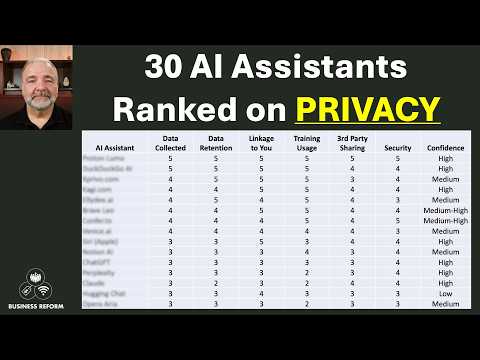 AI Privacy ComparedAs of Nov 6, 2026, ChatGPT, Microsoft Copilot, Mistral's Vibe, Perplexity, Grok and DeepSeek can train on consumer chats unless you opt out, Gemini trains only while Keep Activity is on, and Claude trains only if you allow it; business plans from OpenAI, Anthropic, Microsoft and Perplexity do not train on your data.