
 All vikis
 007 First Light
 Aion 2
 Ananta
 ARC Raiders
 ArcheAge Chronicles
 Call of Duty: Modern Warfare 4
 ChatGPT
 Chrono Odyssey
 Civilization 3
 Civilization 4
 Claude
 Crimson Desert
 Deadlock
 Diablo 4
 Diablo 5
 Enshrouded
 Fable
 Final Fantasy Resonance
 Football Manager 27
 Forza Horizon 6
 God of War
 Grand Theft Auto 6
 Heroes of Might and Magic 3
Galaxy AI
Galaxy AI is Samsung's set of AI features on Galaxy phones from the S24 series on, plus newer tablets, watches and earbuds, such as Photo Assist, Interpreter, Call Screening and Now Brief. Samsung says its basic features are free, while future enhanced features may be paid, and Google's Gemini works alongside it.
Galaxy AI is Samsung's name for the AI features built into its Galaxy devices: photo editing by text prompt, live call and conversation translation, call screening, transcription and summaries, writing help and personal briefings. It runs on Galaxy smartphones from the S24 series onward, with support on tablets, watches and earbuds depending on the model. Samsung says its basic Galaxy AI features are free, and that future releases may add enhanced features or services offered on a paid basis (as of Nov 6, 2026); features from third parties such as Google can have their own terms.
Galaxy AI is the AI you already have on a recent Samsung phone, best for quick tasks inside the phone's own apps: editing photos, translating a call, cleaning up a recording. For a general assistant that answers questions, researches and writes at length, use Google's Gemini, which Samsung ships on its phones, or ChatGPT. iPhone owners get the equivalent in Apple Intelligence.
Quick facts
| Maker | Samsung |
| Price | Basic features free; enhanced features may be paid in future (as of Nov 6, 2026) |
| Phones | Galaxy S24 series and later, including Galaxy S26 Ultra and Z Fold8 |
| Other devices | Galaxy Tab S11 and S12, Galaxy Watch9 and Watch Ultra2, Galaxy Buds4 and Buds4 Pro (features vary) |
| Software | One UI; some features need One UI 9.0 |
| Assistant | Bixby, alongside Google's Gemini |
| Account | Some features need a Samsung account |
Is Galaxy AI free?
Yes, for now. Samsung's footnote reads that "Galaxy AI basic features provided by Samsung are free," and adds that future releases may include enhanced features or new services offered for a fee (Samsung UK, read Nov 6, 2026). It names no end date and no price. Third-party AI features on Galaxy phones, such as Google's, follow their makers' terms: the Galaxy Z Fold8 comes with a six-month trial of Google AI Pro, with 5 TB of storage and more Gemini Notebook use.
Features
| Feature | What it does |
|---|---|
| Now Brief | A personalized daily briefing you can steer with prompts |
| Now Nudge | Suggests actions from what is on screen, such as opening Calendar while you make plans in a chat |
| Photo Assist | Moves, resizes or deletes objects and adds new ones by typed request; AI edits carry a visible watermark |
| Creative Studio | Makes designs and sticker sets |
| My FanCam | Turns a wide video into one that follows a chosen person |
| Audio Eraser and Auto Trim | Removes background noise from videos and cuts highlight clips |
| Call Screening | Asks unknown callers why they are calling and can end spam calls |
| Interpreter | Live translation of a conversation through the phone and Galaxy Buds |
| Transcript Assist | Transcribes and summarizes recordings |
| Writing Assist | Proofreads, rewrites and summarizes text |
| Document Scan | Scans and cleans up documents, up to 350 pages a session on One UI 9.0 |
| Bedtime Guidance, Energy Score | Health insights from Galaxy Watch data |
| Bixby | Answers questions, fixes device settings and searches the web |
Source: Samsung Galaxy AI and Galaxy Z Fold8 pages, read Nov 6, 2026.
Galaxy AI and Gemini
Samsung's newest phones mix Samsung's own features with Google's Gemini. On the Galaxy Z Fold8, Samsung offers Gemini Notebook, which turns photos, documents and other sources into infographics and audio overviews, powered by what it calls Gemini Intelligence (Samsung). Google's Gemini app is available on Android phones, Galaxy included; see Gemini for its plans and limits. Samsung's own assistant, Bixby, handles device tasks and questions.
Privacy
Samsung's Knox Privacy settings let you choose whether Galaxy AI processes your personal data only on the device or also in the cloud (Samsung). Features that use Google's services follow Google's privacy policy. See AI Privacy Compared.
Galaxy AI vs the alternatives
- Gemini: Google's assistant app on Android, Galaxy included; the stronger choice for questions, research and long writing.
- Apple Intelligence: Apple's equivalent on iPhone, iPad and Mac, with Siri AI, free with the device.
- ChatGPT: a general chatbot app on any phone, with voice mode.
- Alexa+: Amazon's assistant for the home and Echo devices.
Frequently asked questions
Is Galaxy AI free? Yes. Samsung says Galaxy AI's basic features are free, though future releases may add enhanced features or services for a fee, as of Nov 6, 2026.
Which phones have Galaxy AI? Galaxy AI runs on Samsung Galaxy smartphones from the Galaxy S24 series onward, including the Galaxy S26 Ultra and Z Fold8, with features varying by model.
Is Galaxy AI the same as Gemini? No. Galaxy AI is Samsung's own set of features, such as Photo Assist and Interpreter, while Gemini is Google's assistant; newer Galaxy phones include both, and some Samsung features such as Gemini Notebook use Google's Gemini.
Can Galaxy AI keep my data on the phone? Yes. Samsung's Knox Privacy settings let you choose whether Galaxy AI processes your personal data on the device or in the cloud.
What is new in Galaxy AI? Recent additions on Samsung's pages include Now Nudge, Photo Assist with typed prompts, My FanCam, Creative Studio and, on the Galaxy Z Fold8, Gemini Notebook.
Sources
- Galaxy AI, Samsung US, read Nov 6, 2026
- Galaxy AI, Samsung UK, read Nov 6, 2026
- Galaxy Z Fold8, Samsung US, read Nov 6, 2026
- Galaxy S26 Ultra, Samsung US, read Nov 6, 2026
- A Guided Demo of Galaxy AI | Galaxy S26 Ultra | Samsung, Samsung, Mar 11, 2026 (video)
Moments
A Guided Demo of Galaxy AI | Galaxy S26 Ultra | Samsung
Samsung
Related
-
-
 CometComet is Perplexity's AI web browser, free for everyone since Oct 2, 2025 and available on Mac, Windows, iOS and Android. Its built-in Comet Assistant can read pages and carry out tasks for you; the agent needs a paid Perplexity plan.
-
 Gemini in ChromeGemini in Chrome is Google's Gemini assistant built into the Chrome browser on Windows, Mac, Chromebook Plus and Android. It reads your open tabs and connects to Google apps; its agent, auto browse, is rolling out to Google AI Pro and Ultra subscribers, first in the US.
-
-
 Character.AICharacter.AI is a platform for chatting and role-playing with AI characters, free with ads and optional plans ((c.ai) lite from $4.99 a month, or c.ai+). It filed for Chapter 11 on Oct 12, 2026 to sell itself, with Disney as the lead bidder; the app still runs, and users under 18 cannot use open-ended chat.
-
-
- DoubaoDoubao is ByteDance's AI assistant in China, free on the web and in apps, running ByteDance's own Seed models (Seed 2.1 since Jun 2026) with Seedance video and Seedream image generation built in. Outside China, ByteDance offers a similar assistant called Dola at cici.com.
See also
-
-
-
-
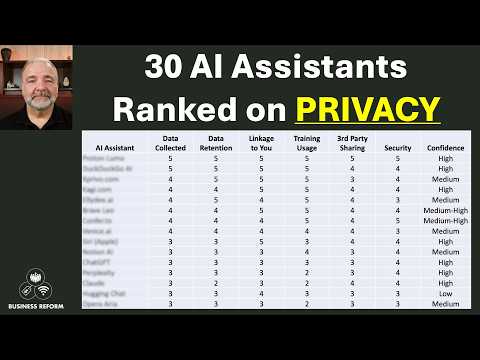 AI Privacy ComparedAs of Nov 6, 2026, ChatGPT, Microsoft Copilot, Mistral's Vibe, Perplexity, Grok and DeepSeek can train on consumer chats unless you opt out, Gemini trains only while Keep Activity is on, and Claude trains only if you allow it; business plans from OpenAI, Anthropic, Microsoft and Perplexity do not train on your data.
-